Best AI Tools for Students
College and university life can be overwhelming. Between assignments, presentations, research papers, exams, and part-time jobs, students often struggle to manage their time effectively. That’s where the best AI tools for students can make a real difference.
Artificial intelligence is no longer just a trend. It’s becoming a practical study companion that helps students write better, organize notes, understand complex topics, summarize long documents, and even prepare for exams.
However, not every AI tool is worth using. Some are designed for professionals, while others are built specifically for learning. Choosing the wrong one can waste both time and money.
In this guide, you’ll discover the best AI tools for students in 2026, what each tool does best, their strengths, limitations, and which students should consider using them.

Table of Contents
- Why Students Are Using AI
- How We Selected These AI Tools
- Comparison Table
- ChatGPT
- Google Gemini
- Claude AI
- Microsoft Copilot
- (More tools in Part 2)
- Frequently Asked Questions
- Final Verdict
Why Students Are Using AI More Than Ever
Technology has completely changed the way students learn.
Instead of spending hours searching through dozens of websites, students can now receive explanations, summaries, brainstorming ideas, and study assistance within seconds.
The biggest advantage isn’t replacing learning.
It’s making learning faster and more organized.
For example, AI can help students:
- Summarize textbooks
- Explain difficult concepts
- Generate study notes
- Improve grammar
- Create presentation outlines
- Solve programming problems
- Organize research
- Practice interview questions
- Translate content
- Generate quiz questions
When used responsibly, AI becomes a productivity assistant rather than a shortcut.
How We Chose the Best AI Tools for Students
Hundreds of AI tools are available today.
Instead of listing every tool on the internet, we selected options based on factors that actually matter to students.
We considered:
- Ease of use
- Free plan availability
- Accuracy
- Writing quality
- Research capabilities
- Learning support
- Overall value
- Cross-device compatibility
These tools are suitable for school, college, and university students.
Comparison Table
| Tool | Free Plan | Best For | Rating |
|---|---|---|---|
| ChatGPT | Yes | Writing & Learning | ⭐⭐⭐⭐⭐ |
| Google Gemini | Yes | Research | ⭐⭐⭐⭐☆ |
| Claude AI | Yes | Long Documents | ⭐⭐⭐⭐⭐ |
| Microsoft Copilot | Yes | Microsoft Office Users | ⭐⭐⭐⭐☆ |
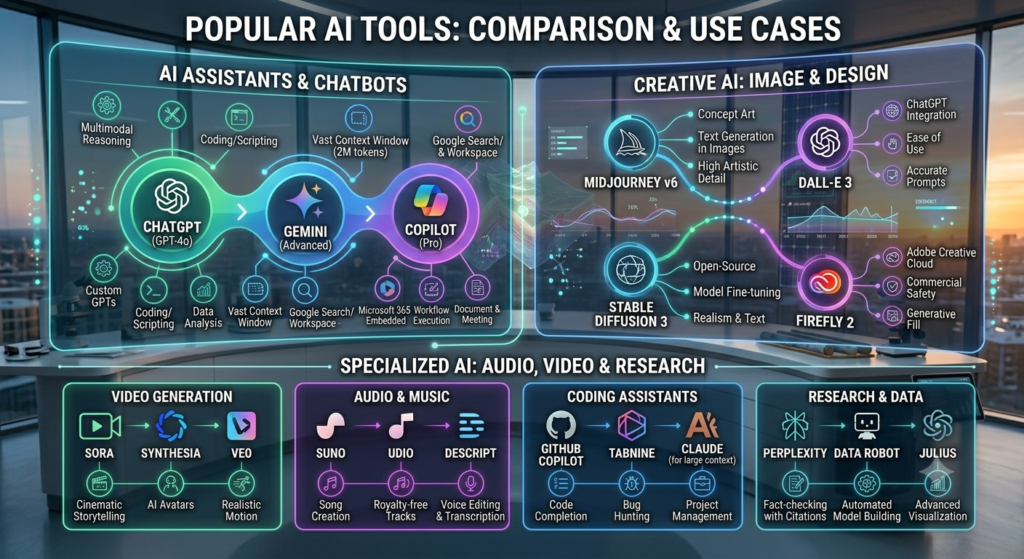
Best AI Tools for Students: ChatGPT
One of the most popular AI assistants available today is ChatGPT.
Students use it for almost everything—from understanding difficult topics to writing first drafts of essays and brainstorming ideas for projects.
One reason ChatGPT stands out is its ability to explain complex subjects in simple language. If you’re struggling with a difficult concept in biology, economics, or programming, it can often break it down into smaller, easier-to-understand steps.
It also performs well when you need help with:
- Essay outlines
- Assignment ideas
- Grammar improvements
- Coding help
- Language learning
- Study schedules
Pros
- Easy to use
- Excellent writing quality
- Supports multiple subjects
- Great brainstorming assistant
- Available on web and mobile
Cons
- Free version has usage limits
- Can occasionally provide incorrect information
- Facts should always be verified before submitting assignments
Best For
Students looking for an all-in-one AI assistant.
Best AI Tools for Students: Google Gemini
Google Gemini is another excellent option, especially for students who already use Google Workspace.
Its biggest advantage is integration with Google services.
If your assignments involve Google Docs, Gmail, or Drive, Gemini can help organize information more efficiently.
Another strength is research.
Gemini can provide multiple perspectives on a topic, making it useful when gathering background information before writing an assignment.
Pros
- Free version available
- Works well with Google ecosystem
- Strong research assistance
- Fast responses
Cons
- Writing style sometimes feels less natural than ChatGPT
- Advanced features may require a paid plan
Best For
Students who already rely on Google services for everyday study.
Best AI Tools for Students: Claude AI
Claude AI has become increasingly popular among students who work with lengthy documents.
Unlike many AI assistants, Claude handles long research papers and large amounts of text more comfortably.
This makes it particularly useful for university students dealing with academic articles, dissertations, and detailed reports.
Many students also appreciate Claude’s writing style because it tends to produce well-structured, readable content.
Pros
- Excellent with long documents
- Natural writing style
- Strong summarization
- Good reasoning abilities
Cons
- Availability varies by region
- Some premium capabilities require a subscription
Best For
University students working with research papers and extensive reading material.
Best AI Tools for Students: Microsoft Copilot
If you spend most of your time using Microsoft Word, Excel, or PowerPoint, Microsoft Copilot deserves serious consideration.
It helps students create presentations, draft reports, organize spreadsheets, and improve productivity without constantly switching between different applications.
For business, engineering, and management students, Copilot can save considerable time during project work.
Pros
- Excellent Microsoft Office integration
- Helpful for presentations
- Strong productivity features
- Good writing assistance
Cons
- Best experience is available with Microsoft ecosystem
- Some advanced features require paid access
Best For
Students who frequently use Microsoft Office applications.
Best AI Tools for Students: Perplexity AI
If your assignments require research, Perplexity AI is one of the most useful AI tools available today.
Unlike many AI chatbots, Perplexity focuses on answering questions while showing the sources it used. This makes it much easier to verify information and continue your research.
Instead of opening ten different websites, students can quickly gather reliable information and explore the original references if they need more detail.
Pros
- Provides source citations
- Excellent for academic research
- Fast and easy to use
- Free version available
Cons
- Not designed for long-form writing
- Some advanced features require a paid subscription
Best For
Students working on research papers, reports, and literature reviews.
Best AI Tools for Students: Grammarly
Writing assignments is about more than just getting the facts right. Clear grammar and professional writing also matter.
Grammarly helps students improve spelling, grammar, punctuation, sentence clarity, and tone.
Even if English isn’t your first language, Grammarly can make your writing sound more polished and easier to read.
Pros
- Excellent grammar correction
- Improves readability
- Easy browser extension
- Works with most writing platforms
Cons
- Premium version unlocks advanced suggestions
- Doesn’t replace careful proofreading
Best For
Students who regularly write essays, reports, or emails.
Best AI Tools for Students: Notion AI
Managing assignments can become difficult when several deadlines arrive at the same time.
Notion AI combines note-taking, task management, document writing, and AI assistance in one workspace.
Students can organize lecture notes, create study plans, summarize meeting notes, and generate first drafts without switching between multiple apps.
Pros
- Excellent organization
- Smart note summaries
- Built-in writing assistant
- Great for planning projects
Cons
- Takes time to learn
- Advanced AI features require a subscription
Best For
Students who want one place for notes, schedules, and assignments.
Best AI Tools for Students: Canva AI
Not every assignment is text-based.
Many students need to design presentations, posters, infographics, or social media projects.
Canva AI makes the design process much easier by generating layouts, images, and presentation ideas in minutes.
Pros
- Beginner-friendly
- Thousands of templates
- AI image generation
- Great presentation tools
Cons
- Some premium assets require Canva Pro
- Limited customization compared to professional design software
Best For
Students creating presentations, posters, and visual projects.
Best AI Tools for Students: NotebookLM
NotebookLM is designed for students who work with their own documents.
Instead of answering questions using general knowledge alone, it can analyze the documents you upload and help summarize or explain them.
This makes it useful when studying lecture notes, PDFs, research papers, or class materials.
Pros
- Works with uploaded documents
- Excellent summaries
- Helps understand complex material
- Saves study time
Cons
- Availability may vary by region
- Best results depend on document quality
Best For
Students preparing for exams using their own notes.
Best AI Tools for Students: Otter AI
Taking notes during lectures isn’t always easy.
Otter AI records conversations and converts speech into text automatically.
Students can focus on listening instead of writing every sentence.
Later, the transcript can be searched and reviewed whenever needed.
Pros
- Automatic transcription
- Saves lecture notes
- Searchable transcripts
- Mobile friendly
Cons
- Accuracy depends on audio quality
- Free plan includes monthly limits
Best For
Students attending lectures, seminars, or online classes.
Best AI Tools for Students: Gamma
Many students struggle when creating presentations.
Gamma uses AI to generate modern-looking presentations from simple prompts.
Instead of spending hours arranging slides, students can focus on the content while Gamma handles the design.
Pros
- Beautiful presentations
- AI-generated layouts
- Fast workflow
- Easy editing
Cons
- Advanced features require payment
- Less flexible than manual presentation software
Best For
Students preparing classroom presentations quickly.

Which AI Tool Is Best for You?
The answer depends on your needs.
- Need help writing assignments? ChatGPT is a strong all-round choice.
- Doing academic research? Perplexity AI is excellent for finding and verifying information.
- Working with long research papers? Claude AI performs particularly well with lengthy documents.
- Want better grammar? Grammarly is hard to beat.
- Need organized notes? Notion AI is a great option.
- Creating presentations? Canva AI and Gamma can save significant time.
- Studying from your own PDFs? NotebookLM is worth trying.
Rather than relying on a single tool, many students combine two or three of these apps depending on the task.
Common Mistakes Students Should Avoid
AI can be a powerful learning assistant, but it’s important to use it responsibly.
Avoid these common mistakes:
- Copying AI-generated text without reviewing it.
- Submitting assignments without fact-checking important information.
- Ignoring your instructor’s AI usage policy.
- Depending entirely on AI instead of understanding the topic.
- Forgetting to edit and personalize AI-generated drafts.
Using AI to learn and improve your work is generally more effective than using it to replace your own thinking.
Frequently Asked Questions
Which is the best free AI tool for students?
ChatGPT, Google Gemini, Perplexity AI, and Grammarly all offer useful free plans. The best choice depends on whether you need help with writing, research, or productivity.
Can students use AI for assignments?
Yes, but AI should be used as a study assistant rather than a replacement for your own work. Always verify important information and follow your school’s academic policies.
Which AI tool is best for research?
Perplexity AI is an excellent option because it provides source citations that help students verify information.
Is ChatGPT better than Gemini for students?
ChatGPT generally offers stronger writing assistance, while Gemini integrates well with Google services and is useful for research tasks.
Are AI tools worth paying for?
Many students can complete their work using free plans. However, premium versions may be worthwhile if you regularly write long assignments, conduct research, or use AI every day.
Final Thoughts
Finding the best AI tools for students isn’t about choosing the most popular platform—it’s about selecting the right tool for the right task.
Whether you’re writing essays, preparing presentations, organizing notes, or conducting research, AI can save time and improve productivity when used responsibly.
Start with one or two free tools, learn how they fit into your study routine, and only consider premium plans if they provide genuine value for your academic work.

3 comments
Pingback: Best AI Tools for Content Writing: 10 Easy Tools Every Writer Should Try (2026)
Pingback: Best Free AI Tools in 2026: 10 Amazing AI Tools You Can Use for Free
Pingback: Best AI Coding Tools in 2026: 10 Powerful AI Assistants for Developers - Nextgentech